New Site Setup in Dreamweaver MX
Back
Click on any thumbnail to view a larger image.

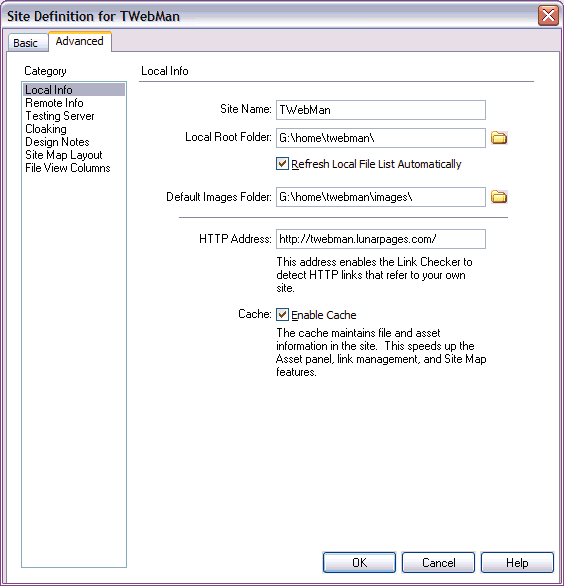
   The image on the right shows the Local Info site definition window for this site.
    The site is on my in a folder called twebman, which is in the directory called home, G: drive.
    G:/home (or G:\home) is my webroot directory.  That is, it's the directory that will come up if I start my web server and go to 'http://localhost'.
    If you specify an images folder, Dreamweaver will automatically copy any images you add to any page in your site into that folder.
    Enable Cache means Dreamweaver will keep track of your links and link system, and can also check for broken links and orphaned files (files that have no links to them).
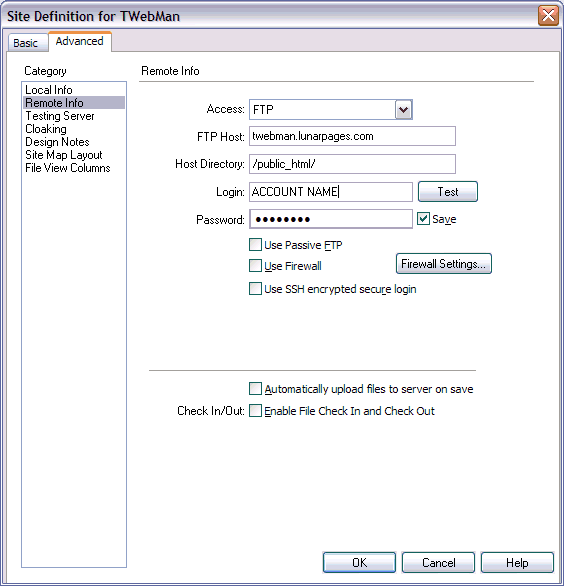
    Here's the remote info window for this site. Note that for th ftp host I just have the site name.  You can use 'yourdomain.com' for the site host (using your real domain name, of course) without the http://www.
    The host directory is where Dreamweaver will start building your site from.  It is the root or home directory of your site.  In the case of Lunarpages, this is the public_html directory.
    The login and password are case sensitive.  Always test the connection when setting up a site to avoid having to troubleshoot later.
    NOTE:  In the Dreamweaver options, you can set the amount of time Dreamweaver will wait before terminating an ftp connection.  When it gets close, you'll see a small countdown in the lower right of the MX window.

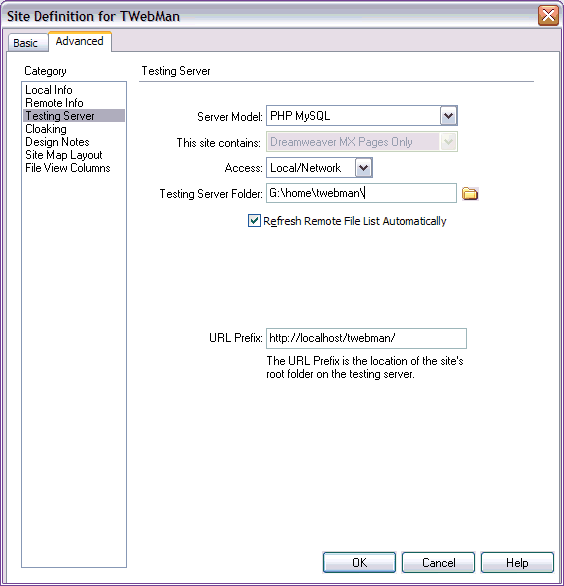
    Here's the testing server window.  The server model is basically the scripting language you are using.  Extensions come out for more server models, so it's good to check every now and then.
    The access field is telling Dreamweaver where you'll be testing your design-time components. 
    If you have a local web server and a mysql database on your local machine, it's a good idea to make your testing server your machine as shown (Local/Network).
    The testing server folder is again, the path to your website.  If it's on the server, just set it to FTP and it will populate the fields with the info you've already entered under 'Remote Info'.
The URL prefix is basically the URL of the site wherever you'll be testing your runtime components.  In my case, it's the local URL.

Back | Home | PHP | Perl | JavaScript